Ticket Sales Link
Ticket Sales Link configures a branded page BoosterConsensus hosts for you
(#/tickets/your-club) that redirects visitors to wherever you actually sell tickets —
a third-party ticketing site, a school box office page, or anywhere else. You share the
BoosterConsensus link; visitors land on your branding, then get sent on to your real
provider.
Where to find it: Club Operations card → Ticket Sales Link button
Who can use this: Club Admins, and board members granted the Manage Payments permission.
Note: This button only appears for clubs still using an external ticketing provider. If your club has switched to BoosterConsensus's native (in-app) ticketing, you'll see a different set of ticketing buttons here instead — event setup, scanner, check-in desk, and box office.
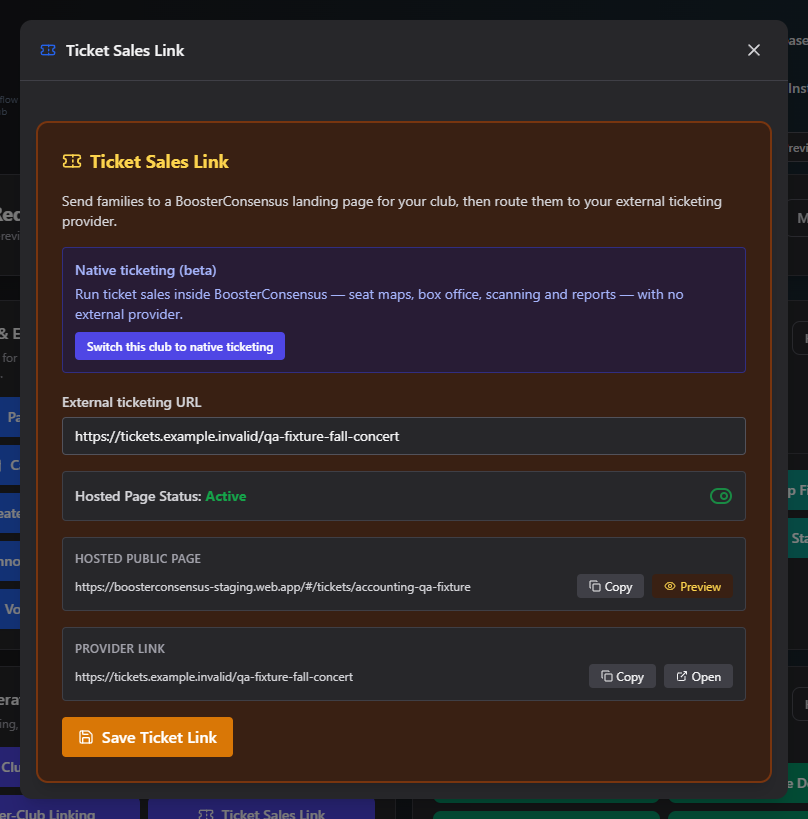
What you can do here
- Set your external ticketing URL
- Turn the hosted page on or off
- Share your links
- Switch to native ticketing
Set your external ticketing URL
- Paste your ticketing provider's URL into the External ticketing URL field.
- Click Save Ticket Link.
Turn the hosted page on or off
The Hosted Page Status toggle controls whether your BoosterConsensus-hosted ticketing page is Active or Inactive. It can't be turned on until a valid URL is saved. When Inactive, the page stays reachable but tells visitors ticket sales are currently unavailable, instead of redirecting them.
Share your links
Two link rows are available once you've saved a URL, each with Copy and an action to open it:
- Hosted public page — your BoosterConsensus-branded page (
#/tickets/your-club). This is the link to actually share with buyers. Preview opens it in preview mode. - Provider link — your saved external URL. Open goes straight to your provider's site, useful for checking it yourself.
Switch to native ticketing
The "Native ticketing (beta)" callout has a "Switch this club to native ticketing" button. This replaces this whole screen with BoosterConsensus's own in-app ticket sales, seating, and scanning tools. This is a one-way switch from this screen — there's no button here to switch back.
Field reference
| Field | Required? | Notes |
|---|---|---|
| External ticketing URL | Yes, before activating | Your provider's ticket sales page |
| Hosted Page Status | No, default Inactive | Blocked from Active until a URL is saved |
Common questions
Why can't I turn on Hosted Page Status? Save a valid External ticketing URL first — activation is blocked until one exists.
What happens to my saved link if I switch to native ticketing? The switch itself doesn't delete anything, but this whole screen is replaced with the native ticketing tools going forward.
Related
- Club Profile — your logo shows on the hosted ticketing page too