Club Operations
The Club Operations card is where you manage your club's identity and the links you share with members, families, and sibling clubs — plus data exports and reimbursement requests. It sits on your Admin Panel alongside Finance & Events, Membership & User Setup, and Governance & Permissions.
Who sees this card: Most of what's here is Club Admin only — unlike other admin cards, very few of these buttons have a delegated-permission path for board members. The exceptions: Ticket Sales Link (board members with Manage Payments), Membership Link & QR Code (your board President automatically, or anyone granted the View Membership Signup Link permission — view-only without Manage), Data Export (board members with View Reports), and Reimbursements (every board member can submit a request; reviewing and approving them needs Manage Accounting).
Note: Several buttons here need a club workspace to be fully set up first — Inter-Club Linking only appears once your club has an Associated School set in Club Profile, and most screens simply do nothing until a club is selected.
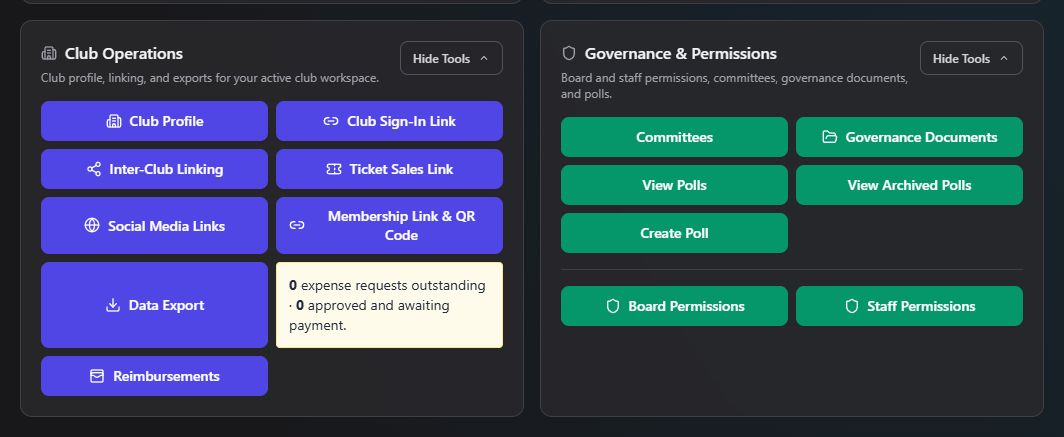
Buttons on this card
| Button | What it's for | Requires permission | Manual |
|---|---|---|---|
| Club Profile | Edit your club's name, description, logo, 501(c)(3) status, school association, contact info, and meeting-platform choice | Club Admin only | club-profile.md |
| Club Sign-In Link | A branded, shareable link to your club's own sign-in page | Club Admin only | club-sign-in-link.md |
| Inter-Club Linking | Link up with sibling booster clubs at the same school | Club Admin only | inter-club-linking.md |
| Ticket Sales Link | Configure your external ticket-sales link, or switch to native in-app ticketing | Club Admin, or board member with Manage Payments | ticket-sales-link.md |
| Social Media Links | Add your Facebook/Instagram/TikTok/other links for the member dashboard | Club Admin only | social-media-links.md |
| Membership Link & QR Code | Generate the public link (and QR code) families use to sign up and pay dues online | Board President automatically, or Manage/View Membership Signup Link | membership-link-qr-code.md |
| Data Export | Export your member roster, dues, board directory, or staff directory as CSV/PDF | Club Admin, or board member with View Reports | data-export.md |
| Reimbursements | Submit and track expense reimbursement requests; approve, allocate, and record payment | Any board member can submit; Manage Accounting to review/approve | reimbursements/ |
Where to start
- Setting up a brand-new club? Start with Club Profile — your logo, contact info, and school association feed into several other screens.
- Ready to open membership sign-ups? Membership Link & QR Code generates the link and QR code families use.
- Selling event tickets through an outside provider? Ticket Sales Link.
- Need club data for a school report or tax filing? Data Export.
- Need to be reimbursed for something you bought for the club? Reimbursements.
Related
- Governance & Permissions — Board Permissions is where you assign the President seat that automatically unlocks Membership Link management
- Finance & Events — Reimbursement payments post to the same books as everything in Accounting