Payments — Overview
Where to find it: Finance & Events card → Payments button → Overview tab (the tab you land on by default)
Overview is your Payments landing page — four key numbers, one-click shortcuts to the other Payments screens, a data-integrity checker (Reconciliation), and a way to run or export a per-item payment status report.
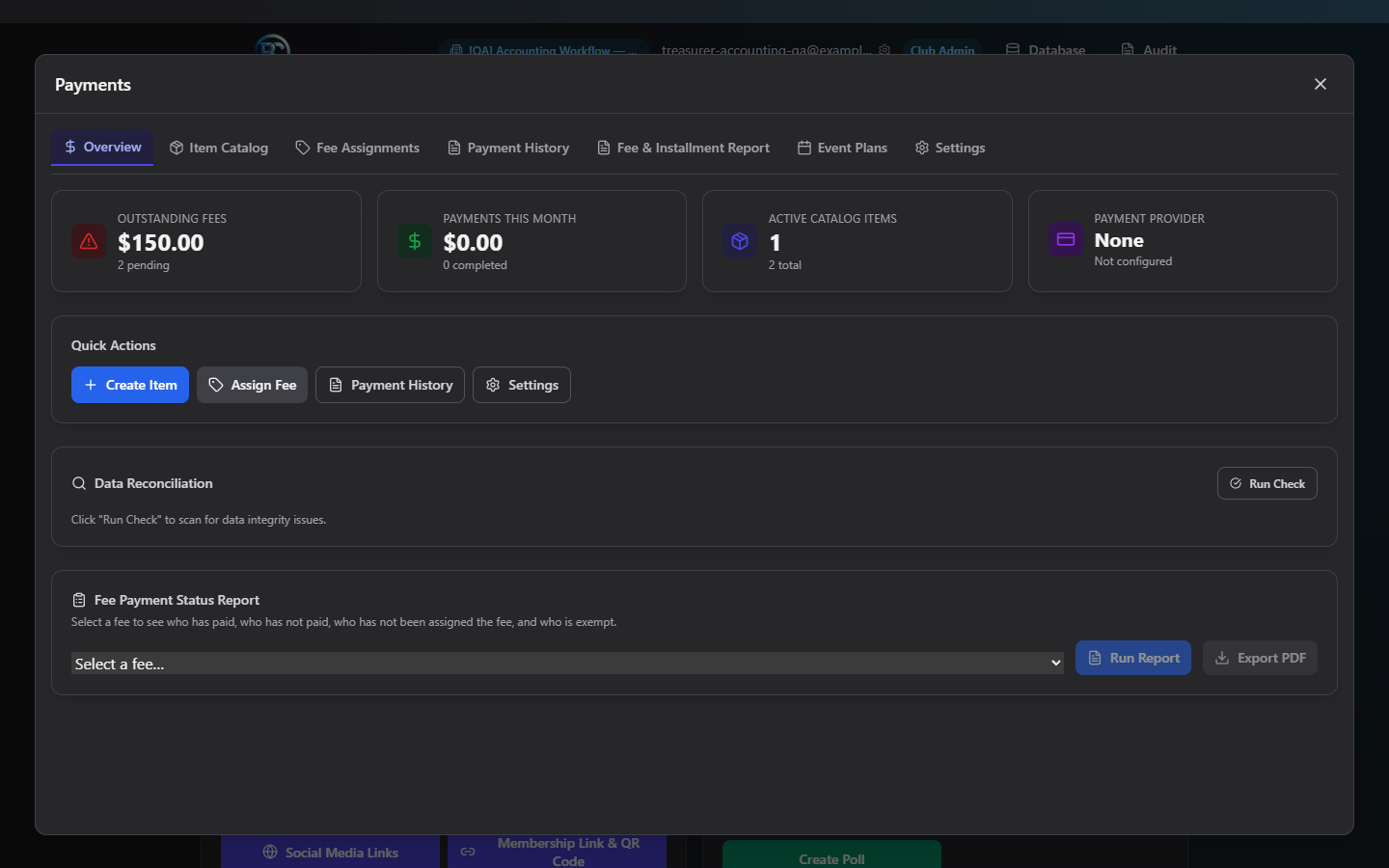
Summary tiles
| Tile | Shows |
|---|---|
| Outstanding Fees | Total dollars still owed, plus how many fees are pending |
| Payments This Month | Total of completed payments in the current calendar month |
| Active Catalog Items | Active items out of your total catalog |
| Payment Provider | Which provider is connected (or "Not configured"), and its connection health |
Quick actions
Four buttons jump straight to another screen: Create Item (Item Catalog), Assign Fee (Fee Assignments), Payment History (Payment History), and Settings (Settings).
Reconciliation (data-integrity check)
A manual, on-demand scan that cross-checks members, fees, and payments for your club and flags two kinds of problems:
- Data issues — structural problems, e.g. an active member with no payment records at all.
- Payment discrepancies — a member whose fees owed don't match what they've actually paid, shown with Owed / Paid / Due amounts.
Workflow: run a reconciliation check
- Click Run Check. There's no confirmation dialog — this is read-only and safe to run anytime.
- If everything checks out, you'll see "No data integrity issues or discrepancies found."
- If problems are found, expand Data issues or Payment discrepancies to see the details.
- For a flagged member, click View Transactions to inspect their history in Payment History, or Edit Fees to correct/waive/cancel the underlying fee in Fee Assignments.
- After making a correction, click Run Check again — nothing auto-refreshes.
Fee Payment Status Report
Pick a fee from the Select a fee dropdown (populated from your active catalog items), then:
- Run Report — opens the full report screen showing every member's payment status for that item.
- Export PDF — downloads the same report as a PDF directly, without opening the report screen first.
Common questions
Why don't my summary tiles match what I expect?
Outstanding Fees only counts pending/installment status fees. Payments This Month
only counts completed payments dated in the current calendar month — a payment
recorded yesterday in a prior month won't show here even if it just cleared.
Do I need to run Reconciliation regularly? It's optional but recommended periodically (e.g. monthly, or before closing your books) — it's the fastest way to catch a member who's missing payment records or a fee/payment mismatch before it becomes confusing later.
Troubleshooting
| If you see... | It means... | Do this |
|---|---|---|
| Payment Provider tile reads "Not configured" | No Stripe/Square connection yet | Go to Settings and connect one |
| Reconciliation shows a red error banner | The check failed to run | Retry — if it persists, note the exact error text |
| Reconciliation button does nothing | No club is currently active | Make sure a club workspace is selected |
Related
- Fee Assignments — fix discrepancies flagged by Reconciliation
- Payment History — investigate a specific member's transactions