Staff Permissions
Staff Permissions grants admin-panel access to staff and advisor members on your roster — people who aren't in a named board seat but still need to help run part of the club.
Where to find it: Governance & Permissions card → Staff Permissions button
Who can use this: Only your Club Admin account.
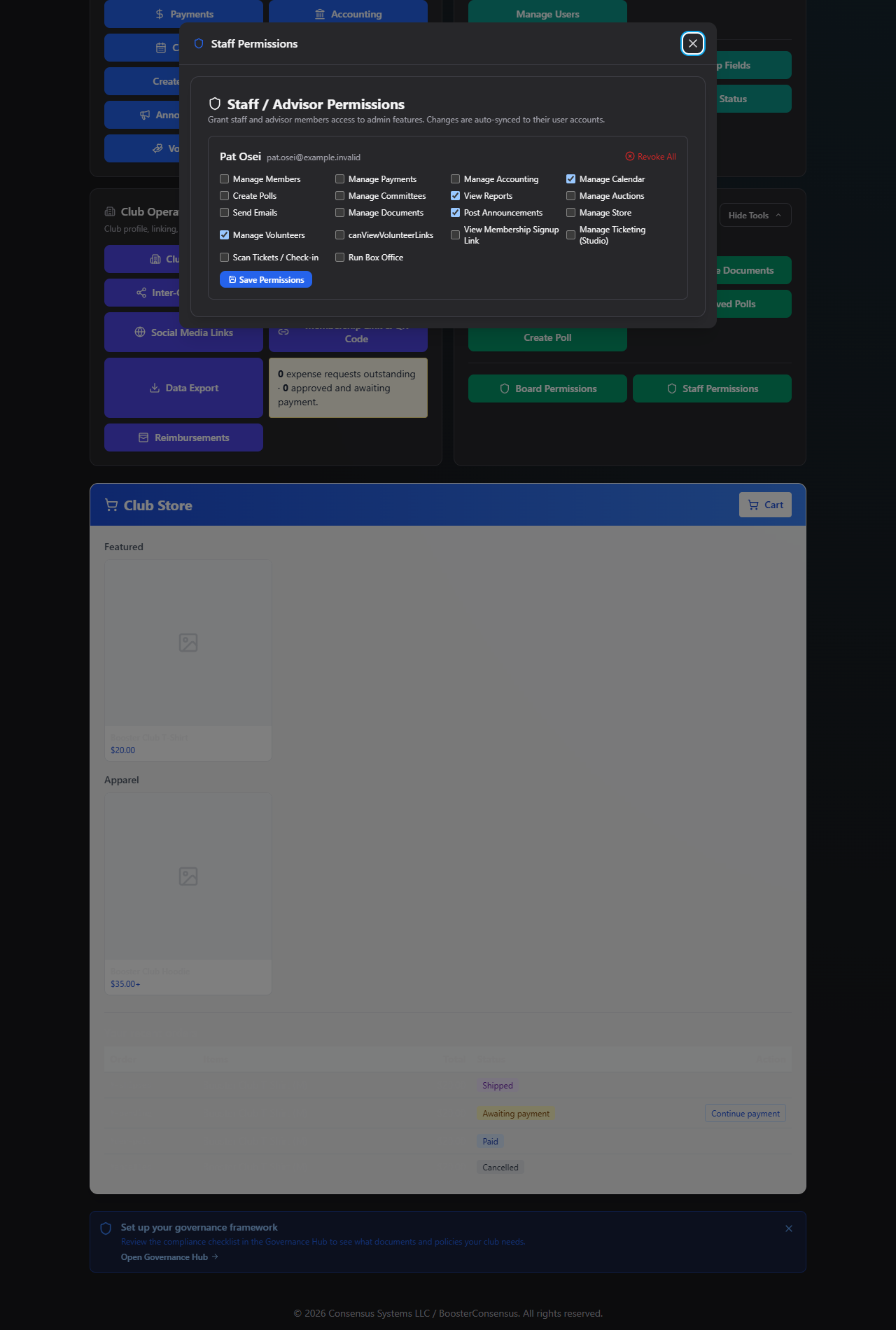
What you can do here
Note: This list is every member on your roster whose role is set to staff. If someone you expect isn't listed, they need to be added as a staff/advisor member first — this screen doesn't add new people to your roster.
Grant permissions to a staff member
- Find their row (sorted by last name).
- Check whichever permissions you want them to have: Manage Members, Manage Payments,
Manage Accounting, Manage Calendar, Create Polls, Manage Committees, View Reports,
Manage Auctions, Send Emails, Manage Documents, Post Announcements, Manage Store,
Manage Volunteers, View Membership Signup Link, Manage Ticketing (Studio), Scan
Tickets / Check-in, Run Box Office, or
canViewVolunteerLinks(view/share volunteer sign-up links). - Click Save Permissions for that row. You'll see a green "Saved & synced" confirmation.
Note: Granting a staff member any permission here automatically upgrades their account so they can access the Admin Panel at all — you don't need to change their role anywhere else first.
Revoke all of a staff member's permissions
If someone currently has at least one permission granted, a Revoke All link appears next to their row. Click it and confirm: "Remove all delegated permissions from {name}? They will lose access to admin features."
This clears every permission at once and, if they were only in the Admin Panel because of this grant, returns their account to how it was before.
Field reference
| Field | Required? | Notes |
|---|---|---|
| Permission checkboxes | No | All unchecked by default for a new staff member |
Common questions
How is this different from Board Permissions? Board Permissions manages named board seats (President, Treasurer, etc.) with assign/vacate and required-seat rules. Staff Permissions is simpler — it's just a list of your staff/advisor roster members, each with their own permission checkboxes and no concept of "positions."
If I revoke all of someone's permissions, do they lose their roster record too? No — Revoke All only removes their delegated admin permissions. Their member/staff record on your roster is untouched.
Troubleshooting
| If you see... | It means... | Do this |
|---|---|---|
| "No staff or advisor members found for this club." | Nobody on your roster is tagged as staff | Add or update a member's role to staff/advisor elsewhere first |
| Save fails with an error | Something went wrong syncing to their account | Try again; if it persists, note the exact error text and contact support |
Related
- Board Permissions — the same permission set, for named board seats instead of staff roster members