Membership Link & QR Code
This is the link (and matching QR code) that lets new families sign themselves up for your club and pay dues online, without you having to create their accounts manually.
Where to find it: Club Operations card → Membership Link & QR Code button
Who can use this: Your Club Admin account, and your board President automatically (by board title, not a permission you have to grant). A board member granted the View Membership Signup Link permission can see the link but not generate, regenerate, or activate/deactivate it — only Club Admins and the President can manage it.
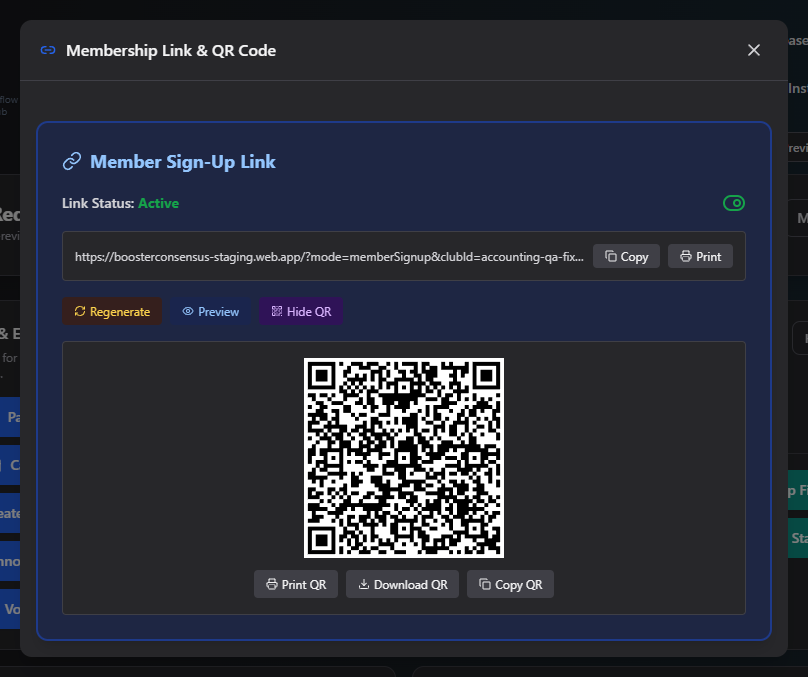
What you can do here
Generate the link
The first time you open this screen, click Generate Sign-Up Link. This creates a unique, tokenized URL families can use to self-register.
Turn sign-ups on or off
The Link Status toggle (Active/Inactive) controls whether the link actually works. When Inactive, visitors who click it see "Registration is currently closed."
Share the link or QR code
- Copy copies the URL to your clipboard.
- Print opens a printable version.
- Preview opens the sign-up page in a new tab so you can see what families see.
- Show QR reveals a scannable QR code encoding the same link, with its own Print QR, Download QR (as a PNG), and Copy QR (copies the image) actions.
Regenerate the link
Click Regenerate to issue a brand-new link. You'll be asked to confirm, since the old link stops working immediately — anyone who still has the old link or QR code (a printed flyer, a saved bookmark) will need the new one.
Common questions
Why can't I generate or regenerate the link? Only Club Admins and your board President can. If you only have the View permission, you can see and share an existing link but not create or change one.
I regenerated the link — do I need to reprint flyers? Yes. Regenerating immediately invalidates the old link and QR code, so anything printed with the old one will stop working.
Related
- Club Sign-In Link — for existing members signing in, as opposed to new families signing up