Payments — Payment History
Where to find it: Finance & Events card → Payments button → Payment History tab
Payment History is the complete, permanent ledger of every payment transaction — online, manual, and installment — with search, filters, CSV export, refunds, and tools to fix a payment that got stuck.
What you can do here
- Search and filter transactions
- Export to CSV
- Issue a refund
- Fix a stuck payment (Mark Paid / Cancel)
- Sync a refund to your payment provider
Search and filter transactions
- Search box matches member name, email, description, type, provider, status, or amount.
- Type dropdown: Dues / Fee / Donation / General.
- Member dropdown narrows to one person (this is how clicking "View Transactions" from Overview's Reconciliation check lands you here, already filtered).
- Status tabs: All / Completed / Pending / Cancelled / Expired / Refunded / Failed — each shows a live count.
- Cancelled/expired transactions older than 30 days are hidden by default to reduce clutter (they're never deleted); check "Show cancelled/expired older than 30 days" to see them.
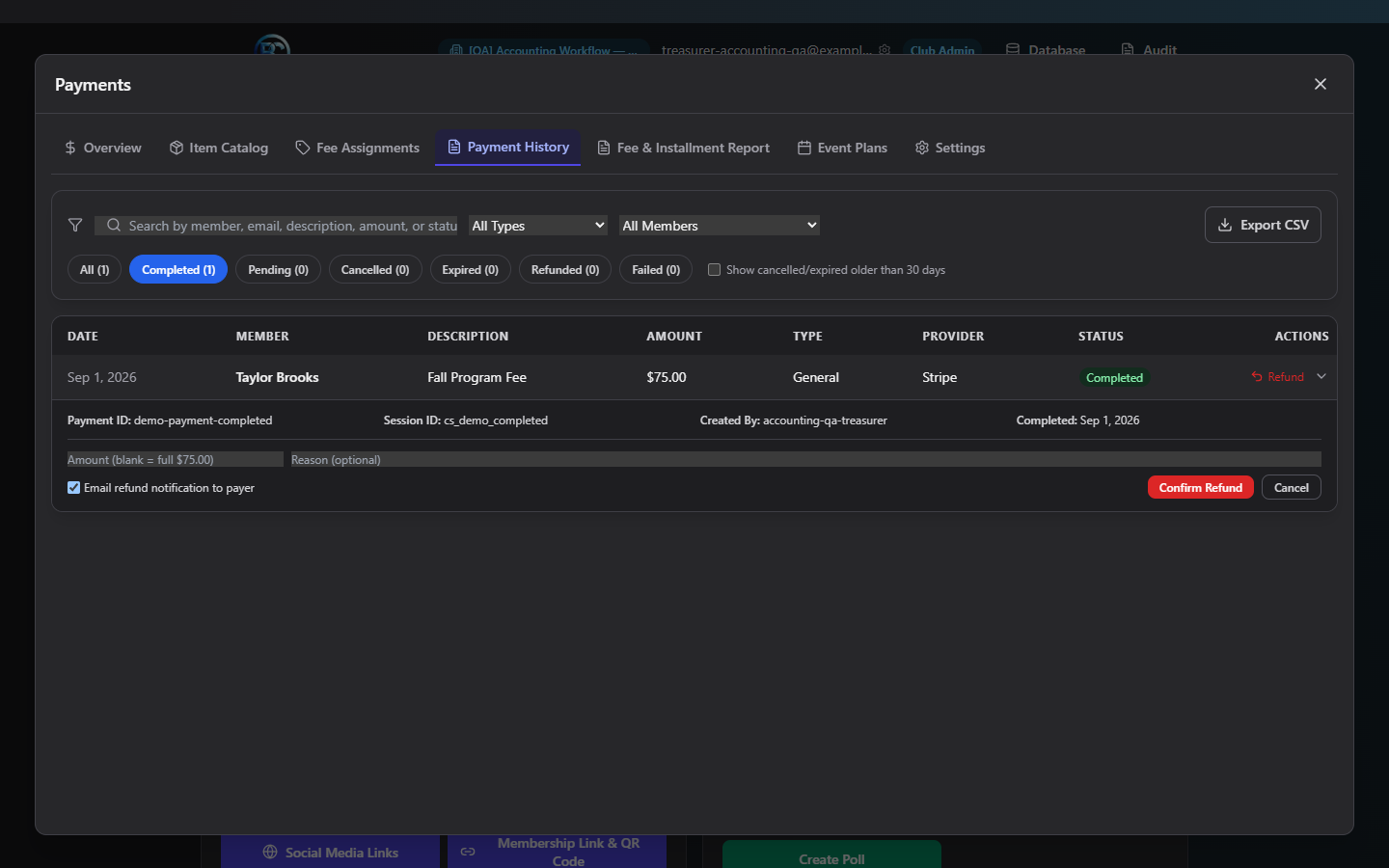
Click any row to expand it and see full detail: Payment ID, Session ID, Method, Created By, Completed date, Check #, and a full Refund History with sync status per refund.
Export to CSV
Click Export CSV to download exactly the rows your current search/filter is showing, with columns Date, Member, Description, Amount, Type, Provider, Status.
Issue a refund
Available on any Completed or Partially Refunded payment. Expand the row and click Refund:
- Amount — leave blank for a full refund of the remaining balance, or enter a smaller amount for a partial refund.
- Reason — optional free text.
- Email refund notification to payer — checked by default.
- Click Confirm Refund, then confirm the dialog, which restates the amount and whether linked fees will be restored to pending.
- The app calls your payment provider's actual refund API — this is a real refund, not just a status change.
Note: A full refund automatically reopens any fee linked to that payment as pending again (the member owes it again). A partial refund leaves linked fees untouched.
Fix a stuck payment
- Mark Paid (on Pending or Expired payments) — forces the payment to Completed and runs the same post-payment steps a real payment would (member activation, installment progress, confirmation email). Use this only after verifying in your Stripe/Square dashboard that the payment actually went through and the app just failed to reconcile it automatically.
- Cancel (on Pending payments only) — for an abandoned checkout. This does not contact your payment provider — it just clears the pending record on this side. Any fee linked to it is released and will need to be reassigned before the member can pay again.
Sync a refund to your provider
If the app shows a payment as refunded but your Stripe/Square dashboard still shows it as paid (a sync gap), a Sync refund to {Provider} button appears — click it to push that refund event to the provider.
Field reference
| Refund field | Required | Notes |
|---|---|---|
| Amount | No | Blank = full remaining balance |
| Reason | No | Free text |
| Email notification | No, default on |
Common questions
Why was my refund rejected? If the payment record has no gateway payment ID on file, the app refuses to guess and tells you to refund directly in your Stripe/Square dashboard (or sync first) — it never does a refund here that could desync from what actually happened at the provider.
A member says they paid but I don't see it — what do I check? Search by their name/email. If you see a Pending or Expired payment and you've confirmed in Stripe/Square that it actually completed, use Mark Paid.
Troubleshooting
| If you see... | It means... | Do this |
|---|---|---|
| Refund amount rejected | You entered more than the remaining refundable balance | Enter an amount at or below what's left |
| Refund button missing entirely | The payment has no gateway ID on file | Refund directly in your Stripe/Square dashboard instead |
| Cancel button missing | Payment isn't in Pending status | Only pending (unfinished) checkouts can be cancelled this way |
Related
- Fee Assignments — reassign a fee that was released by a cancelled payment
- Overview — Reconciliation — the tool that often points you here for a specific member