Dues Settings
Dues Settings controls whether your club charges dues at all, how much, and the rules around when a membership expires and needs renewing.
Where to find it: Membership & User Setup card → Dues Settings button
Who can use this: Only your Club Admin account.
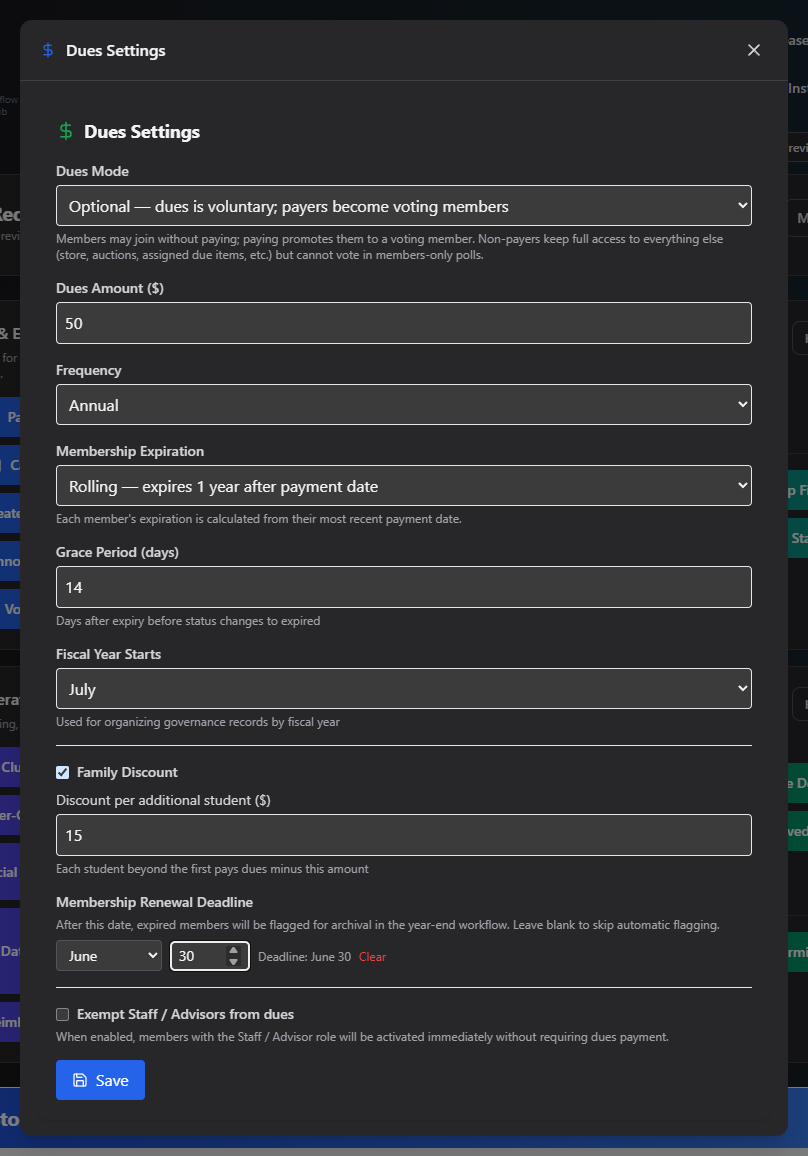
What you can do here
- Choose a Dues Mode:
- None — no dues; everyone is a full voting member.
- Optional — dues are voluntary; only members who pay become voting members.
- Mandatory — dues are required to become a voting member; a lapsed membership automatically loses voting status.
- If dues aren't None, set the Dues Amount and Frequency (Annual or Semester).
- Choose a Membership Expiration mode:
- Rolling — each membership expires 1 year (or 6 months, for Semester) after its payment date.
- Fiscal Year — every membership expires at the end of your fiscal year, regardless of when it was paid.
- Set a Grace Period (days) — how many days after expiration before a membership's status actually flips to Expired.
- Set Fiscal Year Starts (month) — this always applies, even with Dues Mode set to None, since it's also used for governance record organization.
- Optionally enable Family Discount and set a per-additional-student discount amount.
- Optionally set a Membership Renewal Deadline (month + day) — expired members past this date get flagged for archival at year-end. Leave blank to skip this.
- Optionally check Exempt Staff / Advisors from dues so staff/advisor members activate immediately without paying.
- Click Save.
Switching to Fiscal Year expiration mid-year
If you switch Membership Expiration to Fiscal Year after members already have rolling expiration dates, an "Apply to Existing Members" button appears. Click it to retroactively set the fiscal-year-end expiration date on active members who don't have one yet. It reports how many members were updated.
Field reference
| Field | Required? | Notes |
|---|---|---|
| Dues Mode | Yes | None / Optional / Mandatory |
| Dues Amount / Frequency | Only if Dues Mode ≠ None | Annual or Semester |
| Membership Expiration | Only if Dues Mode ≠ None | Rolling or Fiscal Year |
| Grace Period (days) | No | Days after expiry before status flips to Expired |
| Fiscal Year Starts | Yes | Month, defaults to July |
| Family Discount | No | Per additional student |
| Membership Renewal Deadline | No | Month + day; leave blank to skip |
| Exempt Staff / Advisors | No | Checkbox |
Common questions
I set the Renewal Deadline to the same month as my fiscal year start — is that a problem? The form will warn you when you save, since the two are usually meant to be spaced apart, but it isn't blocked.
Related
- Dues Status — see who these settings are currently flagging