Membership & User Setup
The Membership & User Setup card is where you manage who has accounts in BoosterConsensus and how membership and dues work for your club. It sits on your Admin Panel alongside Finance & Events, Club Operations, and Governance & Permissions.
Who sees this card: Manage Users is available to Club Admins and any board member granted the Manage Members permission. Everything else on this card — Create User, Signup Fields, Dues Settings, and Dues Status — is Club Admin only, with no delegated-permission path for board members.
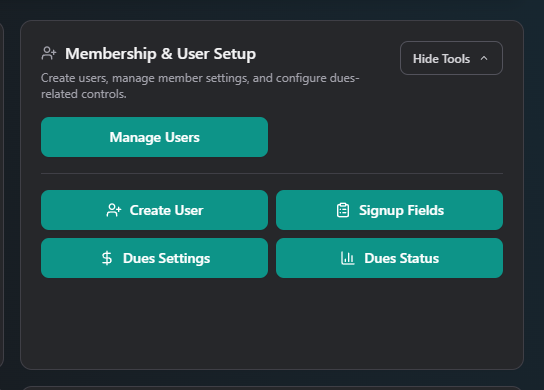
Buttons on this card
| Button | What it's for | Requires permission | Manual |
|---|---|---|---|
| My Record | View and edit your own member record | Only if you have a member record yourself | my-record.md |
| Manage Users | The full user/member list — search, edit, reset passwords, create, archive, and restore | Club Admin, or board member with Manage Members | manage-users/ |
| Create User | Create a new account directly, without going through public sign-up | Club Admin only | create-user.md |
| Signup Fields | Choose which optional fields appear (and are required) on the public member sign-up form | Club Admin only | signup-fields.md |
| Dues Settings | Set whether dues are required, the amount, frequency, expiration rules, and renewal deadline | Club Admin only | dues-settings.md |
| Dues Status | A read-only summary of members who are expired, expiring soon, or have a payment pending | Club Admin only | dues-status.md |
Where to start
- Setting up dues for the first time? Start with Dues Settings to decide whether dues are required and how much.
- Need to add someone's account by hand instead of waiting for them to self-register? Create User.
- Customizing what families fill in when they join? Signup Fields.
- Checking who needs a nudge to renew? Dues Status, then go to Manage Users to act on it.
Related
- Club Operations → Membership Link & QR Code — the link families use to self-register, which is shaped by Signup Fields
- Governance & Permissions → Board Permissions — grant the Manage Members permission that unlocks Manage Users for a board member