Manage Users
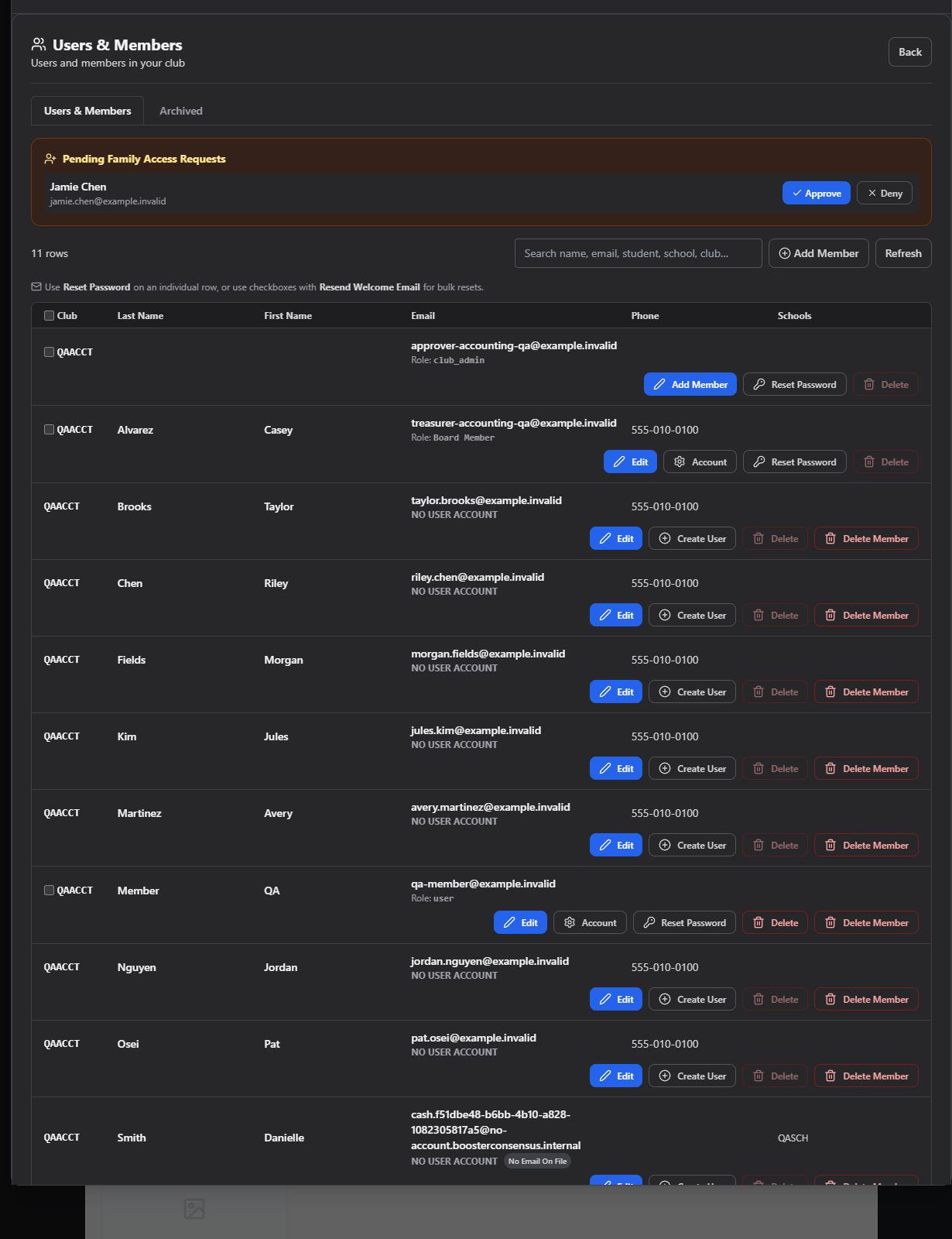
Manage Users is the master list of everyone in your club — both their login account (if they have one) and their member record (if they have one) side by side, in one table.
Where to find it: Membership & User Setup card → Manage Users button
Adding someone who pays cash or check and has no login? Use the toolbar's + Add Member button — see Add a member with no login.
Who can use this: Club Admins, and board members granted the Manage Members permission.
What's in this section
- This page — the main table: search, badges, bulk actions
- Edit Account — the modal for editing someone's account and member details
- Reset Password — issue a new password for someone
- Family Access & Multiple Guardians — approving co-parent link requests, and unlinking a shared account
- Archived Members — the separate list of archived members, and how to restore one
Search the list
Type into the search box to filter by name, email, role, phone number, club/school code, or user/school ID — it matches partial text across all of these at once.
Understand the badges
A row can show several badges next to the person's email:
| Badge | Meaning |
|---|---|
| DISABLED | The account is disabled and can't sign in |
| School-User | This account is scoped to a school, not a club |
| "N linked accounts" | Multiple logins (guardians) share this same member record — see Family Access & Multiple Guardians |
| NO USER ACCOUNT | A member record exists with no login attached |
| No Email On File | Added via + Add Member with no real email on file — a cash/check-paying family that hasn't signed up. See Add a member with no login |
| ⚠ Auto-account creation failed | The system tried and failed to create a login for this member automatically |
Take action on a row
Depending on the row, you may see:
- Edit — opens the member editor (details here)
- Account — edit the login's role, club, and active status (details here)
- Reset Password — issue a new password
- Create User — for a member with no login yet, create one directly from this row
- Unlink — for a shared multi-guardian account, sever just this login's access (details here)
- Delete — permanently delete the login account (you can't delete your own account, and Club Admins can only delete User/Voter/Member-role accounts)
- Delete Member — delete just the member record (cancels their fees/payments too), separate from deleting the login
Bulk actions
Check the boxes next to multiple rows (or the header checkbox to select all) to reveal a Resend Welcome Email(s) action, which re-sends the account-setup email to every selected person and reports success/failure per person.
Common questions
Someone has "NO USER ACCOUNT" — how do I fix that? Use the Create User button on their row to create a login directly, or point them to your club's Membership Link to self-register.
What's the difference between Delete and Delete Member? Delete removes the login account (they can no longer sign in). Delete Member removes their member record and cancels associated fees/payments, but leaves any login account intact.
Related
- Dues Status — flags members who need attention here
- Board Permissions — grant Manage Members to a board member so they can use this screen