Review and Approve Reimbursements
Everyone with the Manage Accounting permission sees a review queue below the submission form — every reimbursement request from anyone on your board, waiting on a decision.
Where to find it: Club Operations card → Reimbursements button → Needs Action tab
Who can use this: Club Admins and board members granted Manage Accounting (Treasurers get this by default).
What you can do here
- See what needs a decision
- Approve and allocate to an expense account
- Reject a request
- Ask for more information
- Decide a cancellation request
- Browse every request
See what needs a decision
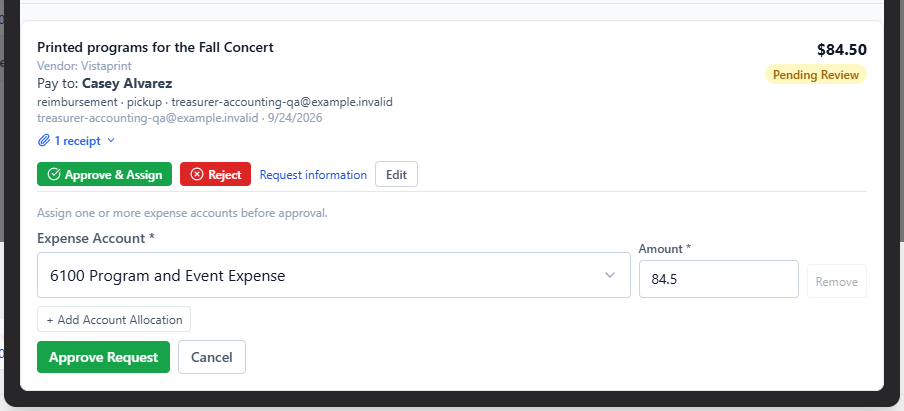
The Needs Action tab shows a card for every request that's Pending, Approved (not yet paid), waiting on more Information, or has a Cancellation request against it. Each card shows the description, vendor, who's being paid, delivery/invoice details, notes, and attached receipts.
Approve and allocate to an expense account
On a Pending request, click Approve & Assign (this is disabled until at least one receipt is attached). An allocation editor opens where you assign the request's total to one or more expense accounts — you can split a single request across several accounts, but the amounts must add up to exactly the request total before you can submit.
Note: You can't approve your own request, even if you hold Manage Accounting — a different accounting approver has to sign off. If you submitted a request yourself, ask another Club Admin or accounting-permission board member to approve it.
Reject a request
Click Reject and enter a reason (required) — the requester sees this reason and the request moves to Rejected.
Ask for more information
Click Request information and enter what you need — the request moves to Information needed, and the requester can edit and resubmit it.
Decide a cancellation request
If a requester tried to cancel a request after you'd already started reviewing it, it shows as needing a cancellation decision instead of your normal actions. This specific decision — Approve cancellation or Decline cancellation — is restricted to whoever currently holds the President or Treasurer board seat, even if you otherwise have Manage Accounting.
Browse every request
The All Requests tab lists the complete history — submitted date, description (click to expand the full review details inline), vendor, amount, expense date, and status — with a Load older requests button to page through history.
Common questions
Why is "Approve & Assign" disabled? The request needs at least one attached receipt before it can be approved.
I clicked Approve Request and got a "different accounting approver" error. You submitted this request yourself — the system won't let the same person both submit and approve a reimbursement. Have another Club Admin or board member with Manage Accounting approve it instead.
Why can't I approve or decline a cancellation request even though I have Manage Accounting? That specific decision is reserved for whoever currently holds the President or Treasurer board seat — ask one of them to make the call.
What happens after I approve a request? It moves to Approved — Pending Payment, waiting for someone to record the actual payment.
Related
- Submit a Request — the form this queue is reviewing
- Record Payment — the next step after approving