Meeting Archive
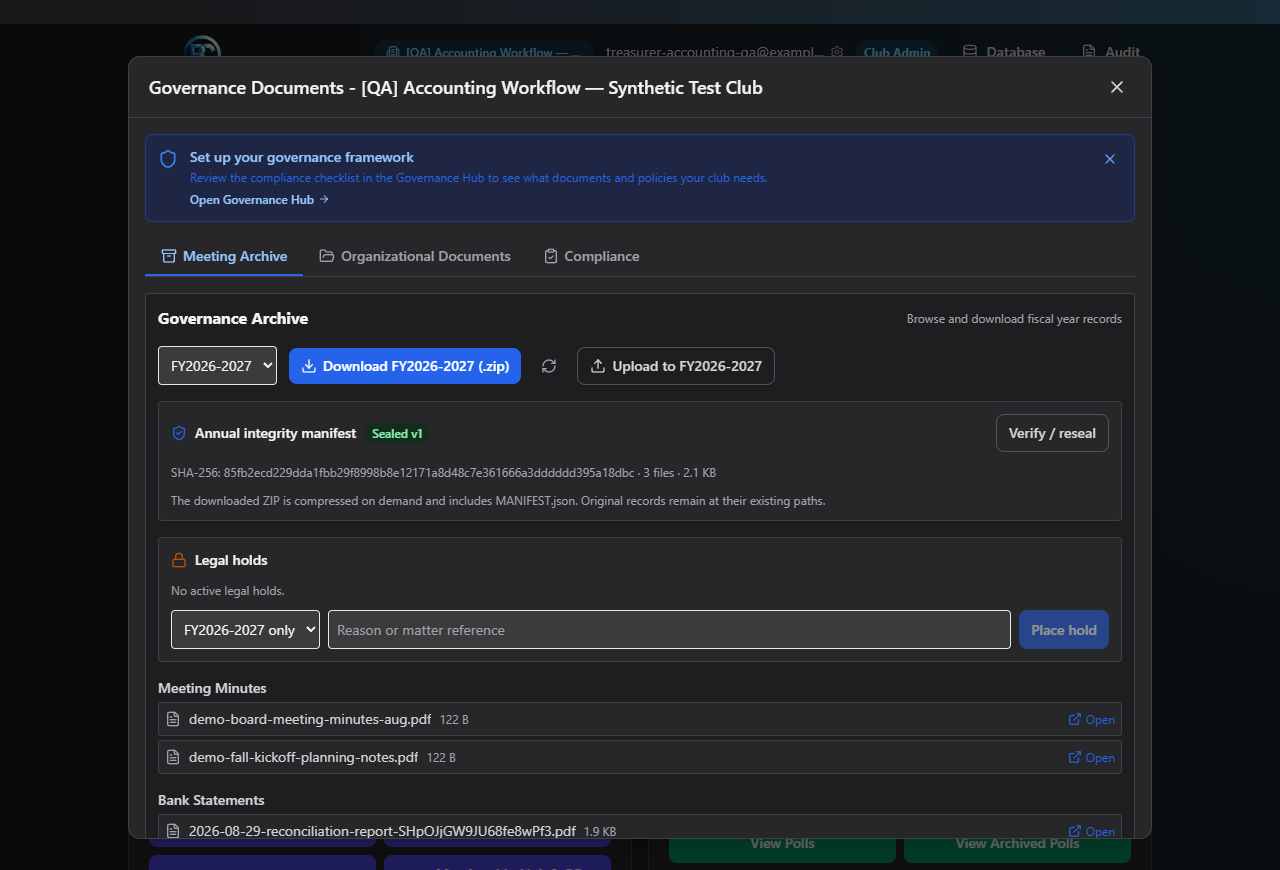
The Meeting Archive organizes your club's meeting-related records by fiscal year — minutes, treasurer's reports, bank statements, poll/election results, motions, and year-end summaries.
Where to find it: Governance & Permissions card → Governance Documents → Meeting Archive tab
Who can use this: Club Admins, and board members granted Manage Documents.
What you can do here
- Browse and download a fiscal year's files
- Seal an archive for integrity
- Place or release a legal hold
Note: You don't upload meeting minutes here directly — they're filed automatically once you archive a meeting's minutes in Committees. Everything else on this tab (bank statements, financial reports, etc.) is uploaded from Organizational Documents using a fiscal-year category.
Browse and download a fiscal year's files
- Pick a fiscal year from the dropdown — only years that actually have files appear.
- Files are grouped under headings: Meeting Minutes, Treasurer's Reports & Financial Reports, Bank Statements, Poll & Election Results, Motions, Year-End Summary, and Other Documents.
- Click a file's Open link to view it, or click Download {Fiscal Year} (.zip) to
get everything for that year in one zip file (including a
MANIFEST.jsonlisting). - If a year has more than 50 files, click Load More Files to see the rest — you'll also see a note that downloading may take a moment.
Seal an archive for integrity
Once you've finished filing everything for a fiscal year, you can seal it so any later tampering is detectable:
- Select the fiscal year.
- Click Seal archive (or Verify / reseal if it's already sealed and you've since added files).
- The status changes to Sealed v{N}, and you'll see the archive's file count, total size, and integrity hash.
Place or release a legal hold
A legal hold prevents an archive from being altered while it's relevant to a legal matter.
To place a hold:
- Choose a scope: {Fiscal Year} only or Entire club.
- Enter a Reason or matter reference — at least 5 characters.
- Click Place hold.
To release a hold: click Release next to the active hold and enter a release reason when prompted.
Field reference
| Field | Required? | Notes |
|---|---|---|
| Fiscal year | Yes (to browse/download/seal) | Only years with files appear |
| Legal hold scope | Yes | One fiscal year, or the entire club |
| Legal hold reason | Yes | Minimum 5 characters |
| Release reason | Yes | Entered when releasing a hold |
Common questions
Where do meeting minutes actually get uploaded? They aren't uploaded here — a meeting's minutes are filed into this archive automatically when you archive them from Committees → Minutes.
What does sealing an archive actually protect against? It creates a verifiable fingerprint (a hash) of everything filed for that year, so you can later confirm nothing has changed. It doesn't lock the files from being added to — use a legal hold for that.
Troubleshooting
| If you see... | It means... | Do this |
|---|---|---|
| "No fiscal years found" | Nothing has been filed to the archive yet for this club | File your first documents/minutes, then check back |
| "No governance documents have been filed yet." | Same as above — minutes are filed automatically only after they're archived from a meeting | See Minutes |
| Download seems slow | The archive has many files (a warning appears above 50) | Wait for the zip to finish compressing |
Related
- Minutes — how records actually get into this archive
- Organizational Documents — where fiscal-year category documents like bank statements are uploaded