Accounting — Setup
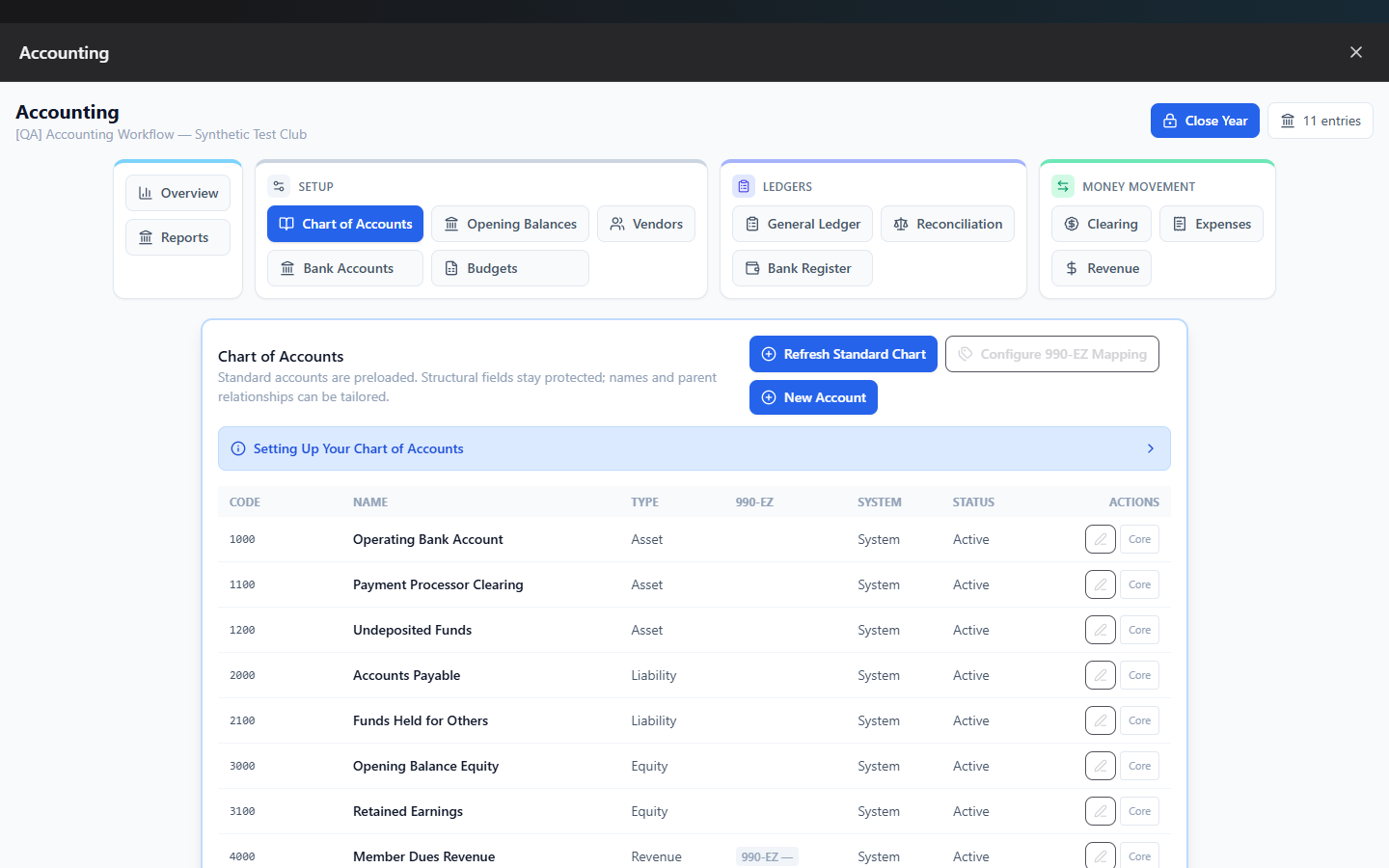
Where to find it: Finance & Events card → Accounting button → Chart of Accounts, Bank Accounts, Vendors, and Opening Balances tabs (grouped under "Setup" in the tab bar), plus the Escrow configuration reached from Overview
This is the foundation you build once, then revisit occasionally: what accounts exist, which bank accounts you're tracking, who you pay, and your starting balances.
What you can do here
- Initialize your Chart of Accounts
- Add a club-specific account
- Map accounts to IRS 990-EZ lines
- Add a bank account
- Set opening balances
- Add a vendor
- Escrow / Held-Funds default
Initialize your Chart of Accounts
Click Initialize Standard Chart (on Overview or the Chart of Accounts tab) to create 15 standard nonprofit accounts in one click:
| Code | Name | Type |
|---|---|---|
| 1000 | Operating Bank Account | Asset |
| 1100 | Payment Processor Clearing | Asset |
| 1200 | Undeposited Funds | Asset |
| 2000 | Accounts Payable | Liability |
| 2100 | Funds Held for Others | Liability |
| 3000 | Opening Balance Equity | Equity |
| 3100 | Retained Earnings | Equity |
| 4000 | Member Dues Revenue | Revenue |
| 4100 | Program and Event Revenue | Revenue |
| 4200 | Fundraising Revenue | Revenue |
| 4900 | Miscellaneous Revenue | Revenue |
| 6100 | Program and Event Expense | Expense |
| 6200 | Payment Processing Fees | Expense |
| 6300 | Supplies Expense | Expense |
| 6900 | Miscellaneous Expense | Expense |
If your chart already exists, the button relabels to Refresh Standard Chart, which re-syncs these system account definitions without touching your own custom ones.
Add a club-specific account
Click New Account and fill in:
| Field | Required | Notes |
|---|---|---|
| Code | Yes | 3–8 digits, must be unique |
| Name | Yes | Up to 120 characters |
| Type | Yes | Asset, Liability, Equity, Revenue, or Expense |
| Parent Account | No | Rolls this account up under another for budgets/reports |
| Active | — | |
| 990-EZ Line | No | Only shown for Revenue/Expense accounts |
Use Parent Account to group detail accounts under a heading — for example, several specific fundraiser revenue accounts rolled up under a general "Fundraising" parent — so budgets and reports show subtotals.
To retire an account, click its Deactivate icon (confirm required) rather than deleting — its history stays fully intact in reports. Click Reactivate to bring it back.
Note: System accounts (the 15 above) can be renamed, but their code and type are locked — use Deactivate/Reactivate rather than trying to edit those fields.
Map accounts to IRS 990-EZ lines
Click Configure 990-EZ Mapping to see every active revenue/expense account with a dropdown to assign it to the correct IRS 990-EZ line (e.g. "Line 1 — Contributions, gifts, grants"). Adjust as many as you need, then Save All Mappings. This powers the 990-EZ Summary report — any account left unmapped shows up flagged there.
Add a bank account
On the Bank Accounts tab, click Add Bank Account:
| Field | Required | Notes |
|---|---|---|
| Account Name | Yes | Up to 100 characters |
| Opening Balance Date | Yes | Defaults to today |
| Opening Balance | No | If entered, it's posted automatically in the same step |
Each card shows a live current balance and the date it was last reconciled.
Set opening balances
If you need to record a starting balance separately (e.g. for an account that isn't a bank account, or you skipped it when creating the bank account), use Opening Balances: pick the account, an as-of date, and the dollar amount. This automatically offsets against the system "Opening Balance Equity" account so your books stay balanced from day one.
Add a vendor
On the Vendors tab, click Add Vendor:
| Field | Required | Notes |
|---|---|---|
| Name | Yes | Up to 120 characters |
| Email / Phone / Address | No | |
| Tax ID (last 4 digits) | No | Only the last 4 — never the full SSN/EIN |
| 1099 Eligible | No | Check if you pay this vendor ≥$600/year as a non-employee |
| Notes | No |
Once added, a vendor appears in the Expenses form's picker and, if 1099-eligible, in the Vendor 1099 report.
Escrow / Held-Funds default
From Overview, click Configure next to Escrow & Held Funds to set your club's default for how event/trip money that must be held for someone else is tracked:
- Operating Account (comingled) — simpler; funds stay in your normal bank account but are tracked as a liability. Recommended default for most clubs.
- Separate Escrow Bank Account — fully segregated; requires setting up a dedicated bank account and reconciling it separately. Use this if your bylaws require segregation, or you're a fiscal agent for another group.
This only sets the default for new event plans — you can override it per plan, and changing it never affects existing plans.
Common questions
What if I need an account that isn't in the standard 15? Add it with New Account — anything specific to your club (a particular fundraiser revenue line, a specific grant) belongs as a custom account, usually rolled up under a relevant parent.
Can I delete an account by mistake and lose history? No — Deactivate is the only option once an account has any history; it's reversible with Reactivate and never removes past entries from reports.
Troubleshooting
| If you see... | It means... | Do this |
|---|---|---|
| "No available account codes in the 1001–1099 range." | You've reached 99 bank accounts | Contact support — this is an unusual situation |
| Account code rejected | Code isn't 3–8 digits, or is already in use | Pick a different unique code |
| "Only asset accounts can be bank accounts." | You tried to flag a non-Asset account as a bank account | Use an Asset-type account instead |
Related
- Ledgers & Clearing — reconcile the bank accounts you set up here
- Budgets — set targets per account once your chart exists