Creating and Managing a Committee
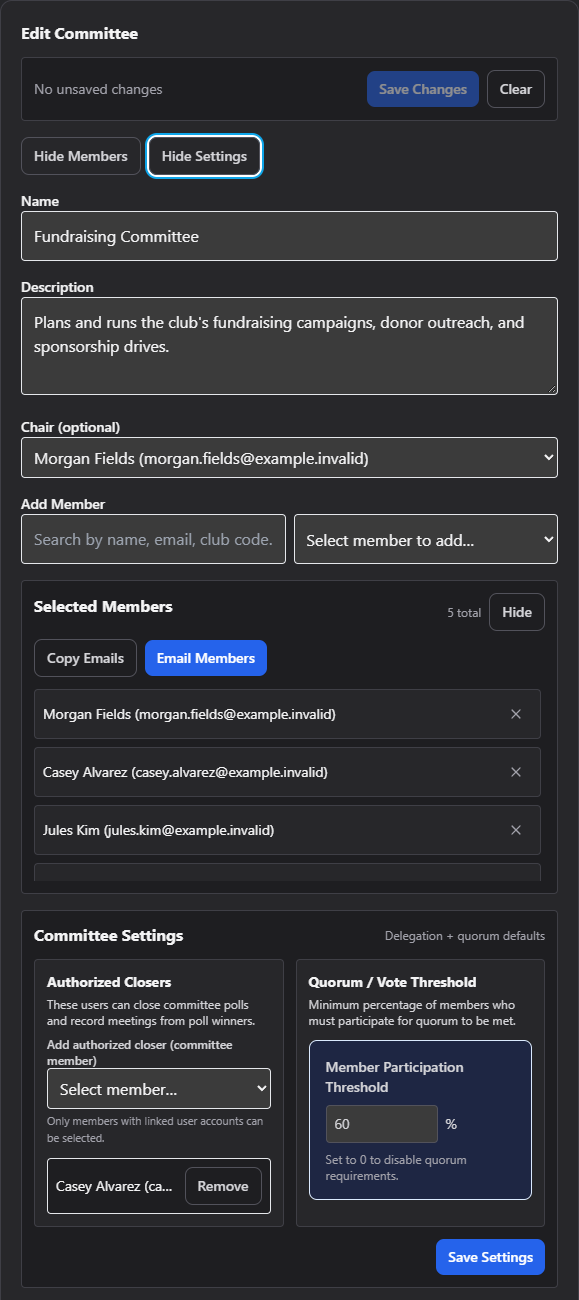
This is the committee editor — the form on the right side of the Committees screen used to create a new committee or edit an existing one's name, chair, members, and settings.
Where to find it: Governance & Permissions card → Committees button → select a committee (or click New Committee)
Who can use this: Club Admins and anyone granted Manage Committees. A committee's chair or creator can also edit that one committee even without the blanket permission.
What you can do here
- Create or edit a committee
- Add and manage members
- Set authorized closers and a quorum threshold
- Request to delete a committee
Create or edit a committee
- Click New Committee (only visible once you already have a committee selected — otherwise the form is already blank and ready).
- Fill in Name — required. You'll see "Committee name is required." if you try to save without one.
- Optionally fill in Description.
- Optionally choose a Chair from the dropdown of your club's members.
- Click Create Committee (or Save Changes if editing). The button is disabled with a "No changes to save" tooltip if you haven't changed anything on an existing committee.
- Click Clear at any time to reset the form back to blank (new committee) or back to the saved version (editing).
Add and manage members
In the People section of the editor:
- Use the search box to filter your club's members by name, email, or member code.
- Pick someone from the Select member to add… dropdown — they're added to the "Selected People" list immediately (up to 250 candidates are shown in the dropdown at once).
- Repeat for each person you want on the committee.
- To remove someone, click the × next to their name in the "Selected People" list. Removing the current chair also clears the Chair field.
Two convenience actions sit above the member list:
- Copy Emails — copies every member's email address, comma-separated, to your clipboard (useful for pasting into an email or another tool).
- Email People — opens your email app with everyone's address pre-filled in the "To" field.
Both are disabled if the committee has no members yet.
Committee settings
Click Show Settings in the editor to reveal two panels:
Authorized closers
People listed here can close this committee's polls and record a meeting from a poll's winning date, even if they aren't the committee chair. Only members who already have a linked user account can be added — pick them from the Add authorized closer dropdown, then remove anyone with the × next to their name.
Member participation threshold (quorum)
A single field — enter the percentage of committee members who must participate for a decision to count (0–100, up to two decimal places). Set it to 0 to turn off quorum requirements for this committee entirely.
Click Save Settings to save both panels together. You'll see a "Saved." confirmation, or an error message if the save fails.
Request to delete a committee
Click the trash icon next to a committee in the picker list (only visible to the committee's manager, chair, or owner). This doesn't delete anything right away — it sends a deletion request to your Club Admin (or Zeus Admin) for approval.
Note: Your club's official board committee is protected — you'll always see it in the list (marked with a "Your board" badge), and it isn't something you create or delete like a regular committee.
Field reference
| Field | Required? | Notes |
|---|---|---|
| Name | Yes | Blocked with "Committee name is required." if blank |
| Description | No | Free text |
| Chair | No | Any club member; clearing a member also clears Chair if they were it |
| Authorized closers | No | Must have a linked user account to be selectable |
| Member participation threshold | No | 0–100%, two decimal places; 0 disables quorum |
Common questions
Can I have a committee member who isn't a chair but can still close polls and record meetings? Yes — add them under Authorized Closers in Committee Settings, not by making them Chair.
I deleted my only member from the "Selected People" list by accident — did that delete their account? No — removing someone from a committee only removes them from that committee's roster. Their member record and login are unaffected.
Troubleshooting
| If you see... | It means... | Do this |
|---|---|---|
| "Committee name is required." | You tried to save with a blank Name field | Enter a name and save again |
| "No changes to save" (button disabled) | Nothing on the form differs from what's saved | Make a change first, or there's nothing to do |
| A member doesn't appear in "Add authorized closer" | They don't have a linked user account yet | Have them create/claim their account, then try again |
Related
- Committee Workspace — documents, announcements, and scheduling for a committee once it exists
- Building a Meeting Agenda