Poll Dashboard
Both View Polls and View Archived Polls open the same Poll Dashboard — the only difference is that View Archived Polls immediately pops open the Archived Polls window on top of it. Everything below applies to both.
Where to find it: Governance & Permissions card → View Polls or View Archived Polls
Who can use this: Club Admins, and board members granted Create Polls.
What you can do here
- Find a poll
- Archive, delete, or open a poll from the list
- View archived polls
- Manage a poll you've opened
Find a poll
- Use the committee filter dropdown (if your club has committees) to narrow the list to one committee's polls.
- Use the search box to search by title, poll ID, date, creator, or committee name. Click Clear to reset it.
- If there are more polls than fit on one page, click Load More Polls at the bottom.
Archive, delete, or open a poll from the list
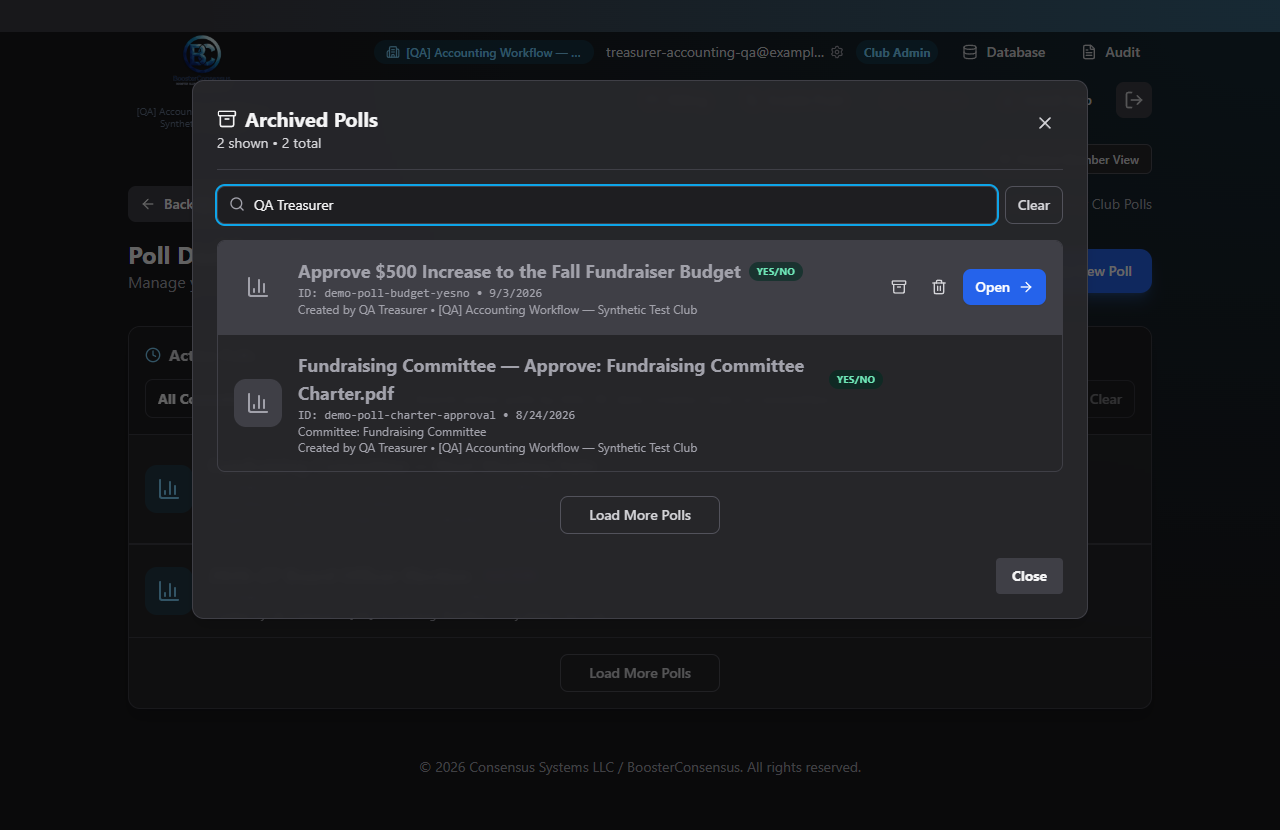
Hover over any poll row to reveal three actions:
- Archive — moves it out of the active list (click again on an archived poll to unarchive it). No confirmation is needed.
- Delete Forever — permanently removes the poll. You'll be asked to confirm: "Are you sure you want to permanently delete this poll?" This cannot be undone.
- Open → — takes you into the poll itself (same as clicking the row); see Creating a Poll for what's inside.
View archived polls
Click View Archived Polls (top of the dashboard, only shown if you have any). A window opens showing your archived polls with the same search box and the same Archive/Delete/Open actions — so you can unarchive one, permanently delete it, or open it to view/edit it, all from here.
Manage a poll you've opened
Once you're inside a poll (from either the dashboard or Create Poll), a few actions live on its Results tab rather than the dashboard list:
- Close Poll — stops further voting. You'll confirm: "Close this poll? Voting will no longer be allowed." Only the poll's creator, a committee's chair/authorized closer, or a Club Admin can do this.
- Record Meeting — for a Meeting Date poll tied to a committee with a winning date, this records that date straight into the committee's schedule as a meeting. Confirm: "Record the current winning date as a committee meeting?"
- Print / Save Results — exports a PDF of the current results.
- Finalize a meeting date — choose a meeting mode (Virtual / In Person / Hybrid) and, if applicable, a location, then either Send Calendar Invite (if you've linked a Google or Microsoft meeting account) or Send Meeting Invites (a plain email invitation) to notify participants.
Common questions
I archived a poll by accident — is it gone? No — click View Archived Polls, find it, and click the Archive icon again to bring it back to the active list.
What's the difference between Archive and Delete Forever? Archive just hides a poll from the main list — it's fully recoverable. Delete Forever permanently removes it with no way to get it back.
Troubleshooting
| If you see... | It means... | Do this |
|---|---|---|
| No "View Archived Polls" button | You don't have any archived polls yet | Archive a poll first, or there's nothing to view |
| Warning toast when clicking a poll row | Your account doesn't have access to poll features | Ask your Club Admin to grant you Create Polls |
| Close Poll button isn't visible | You aren't the poll's creator, an authorized closer, or a Club Admin | Ask someone with permission to close it, or have yourself added as an authorized closer under Committee Settings |
Related
- Creating a Poll — what's inside a poll once you open it
- Committees — Committee Settings — where authorized closers are set